 Questions
How to build a gantry
Hi everyone,
I’m trying to figure out the best way to model a gantry in realvirtual and I’d like to check if my approach makes sense.
Mechanical setup
-
Think of a classic gantry crane

-
In my machine I have
-
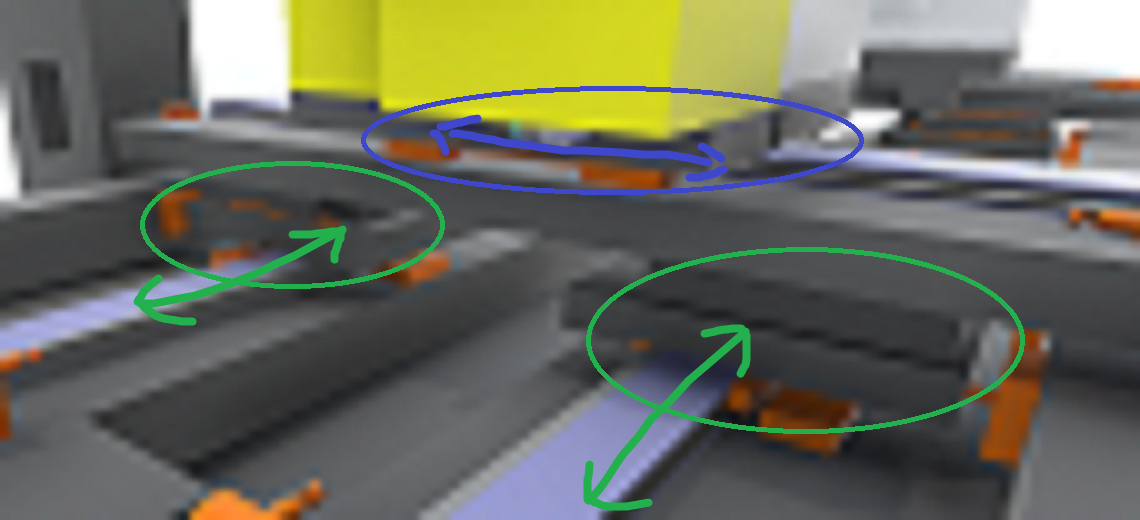
Two separate X-axes at the bottom (front and back rails – green arrows).
They can move independently in X, but in normal operation they should behave like a gantry pair. -
On top of them sits a Y-axis stage (blue arrows) that moves sideways.
-
-
The Y-stage is physically connected to the X-axes via joints in Unity.
-
The CAD / Unity hierarchy is basically flat – the Y-stage is not a child of one of the X carriages, so I cannot rely on parenting to move it together with X.
Control side
-
I have separate drives / axis values for:
-
X-front
-
X-back
-
Y-stage
-
-
The requirement is:
-
When X moves, the whole Y-stage must move with it.
-
Y should still have its own motion relative to the gantry.
-
Questions
-
What is the recommended realvirtual setup for this kind of gantry?
-
How should I combine this with joints?
-
Should I keep the joints at all, or would you recommend a purely kinematic Axis/Drive setup for this use case?
-
Any hints, best practices, or “don’t do this” stories are very welcome.
Thanks in advance!
Answer

Hi,
Thanks for reaching out!
For building hierarchical structures in your simulation, we'd recommend using parenting or Groups combined with Kinematic — you can find detailed guidance here: https://doc.realvirtual.io/components-and-scripts/motion/kinematic
One of the nice things about this approach is that it gives you flexibility regardless of how your Unity hierarchy is currently organized. Moving drives without physical joints also tends to provide better stability, which is especially helpful when you're receiving cyclic position updates from controllers.
As a tip that might simplify things: from a kinematic perspective, X-Front and X-Back effectively function as a single drive, so you may not need to model them separately — that could save you some setup work!
Let me know if you have any questions or if I can help clarify anything further.
Best regards
Thomas
Customer support service by UserEcho


Hi,
Thanks for reaching out!
For building hierarchical structures in your simulation, we'd recommend using parenting or Groups combined with Kinematic — you can find detailed guidance here: https://doc.realvirtual.io/components-and-scripts/motion/kinematic
One of the nice things about this approach is that it gives you flexibility regardless of how your Unity hierarchy is currently organized. Moving drives without physical joints also tends to provide better stability, which is especially helpful when you're receiving cyclic position updates from controllers.
As a tip that might simplify things: from a kinematic perspective, X-Front and X-Back effectively function as a single drive, so you may not need to model them separately — that could save you some setup work!
Let me know if you have any questions or if I can help clarify anything further.
Best regards
Thomas