Teilen Sie Ihre Erfahrunge und Wünsche mit uns und anderen Usern!

 No automatic ADS reconnection after TwinCAT PLC reboot
Hi,
we use realvirtual's TwinCatAdsInterface to communicate with a TwinCAT PLC.
When the PLC reboots, the ADS connection is lost. We receive the anticipated connection-loss error message and all stages move into their configured default positions. However, once the PLC is available again, our application does not reconnect automatically. Normal operation is restored only after restarting our application.
Another application (C# .NET app which is also using the ADS library) connected to the same PLC is able to reconnect successfully after the PLC reboot.
If we use a simulated PLC, the real-virtual interface can reestablish the connection, the problem only occurs when we work with a real PLC.
Environment:
- Unity: 6000.3.22f1
- realvirtual Professional: 6.3.5
- realvirtual Starter: 6.3.5
- TwinCAT/PLC version: v3.1.4026.14
- ADS port: 851
- Update cycle: 100 ms
Steps to reproduce:
1.Establish communication with a real PLC.
2. Confirm normal operation.
3. Reboot the PLC or restart the TwinCAT runtime.
4. Wait until the PLC is available again.
5. Observe the ADS connection without restarting our application.
Expected result:
The TwinCatAdsInterface reconnects automatically after the PLC becomes available again.
Actual result:
The connection-loss error is reported and the stages move to their default positions, but the ADS connection is not restored. Restarting our application is required.
Could you please advise whether a specific reconnect configuration or API call is required, and whether this behavior is a known issue in realvirtual 6.3.5?

 Realvirtual-WEB ReqList
Hello,
I'm glad to test your company's product.The feedback on the RealvirtualWeb functionality test is as follows:
UnityToWeb:
1. Mesh cutting ineffective DemoCSGMachining
2. Hinge ineffective DemoKinematicsSolver
3. Robot time speed change ineffective DemoRobotIK
Web/GLB/Interface:
1. S7 ImportTagTable does not support DB (hope to support import/export, and native TIA exported columns need manual modification to import) [OK]
2. S7 ImportTagTable direction cannot be automatically recognised (ReadFromPLC / WriteToPLC) [OK]
3. Large GLB file export [WebViewer] Export failed: System.IO.IOException: Stream was too long. (deduplication skipped, causing unprocessed data to exceed 2 GB MemoryStream, not an issue with GLB size itself.) [OK]
4. Start Dev Server/Open in Browser (localhost:5173) loading the current model sometimes causes web errors [OK]
"realvirtual WEB OPEN. LIGHT.INDUSTRIAL. ANYWHERE.Could not load the model Unexpected token"
5. OPC UA browser only shows the top-level nodes (subnodes not traversed?)
The OK items were fixed by AI, OPC UA still awaits official update. Thanks in advance~
 Configure Position and Size of Orthographic Overlay Views
Hi,
we are using Unity 6.3 with realvirtual Professional.
When the three orthographic views are enabled, they appear in the lower-left corner and overlap our application UI. We would like to configure their layout so that they can be displayed in the lower-right corner instead.
It would be helpful to configure each view individually:
- Position using X and Y
- Size using Width and Height
- Separate settings for the Front, Top, and Side views
Ideally, these settings could be configured through the Unity Inspector or a ScriptableObject and remain active during runtime.
Is there currently a supported way to configure the position and size of the orthographic overlay views? If not, could this be added as a feature?
Thank you.

ModelZoo / Siemens S7: IO.Input.Machine.bMachiningFinished never becomes true
Hi,
I'm using the Siemens S7 CNC Demo. The first part of the sequence works fine. The robot takes the part, puts it into the machine and the machine starts.
However it never ends. The IO point IO.Input.Machine.bMachiningFinished never becomes true?
Does anyone have an idea about this?
We had this issue also with the TwinCAT Version. I've contacted Andreas FAST but I think it is linked to the Unity Model Logic to stop "machining".
Please have a look at this.
Thx!
Werner

Bug
I use Unity6000.0.58f version and I imported Realvirtual Digital Twin Starter 6.3
And I got these errors
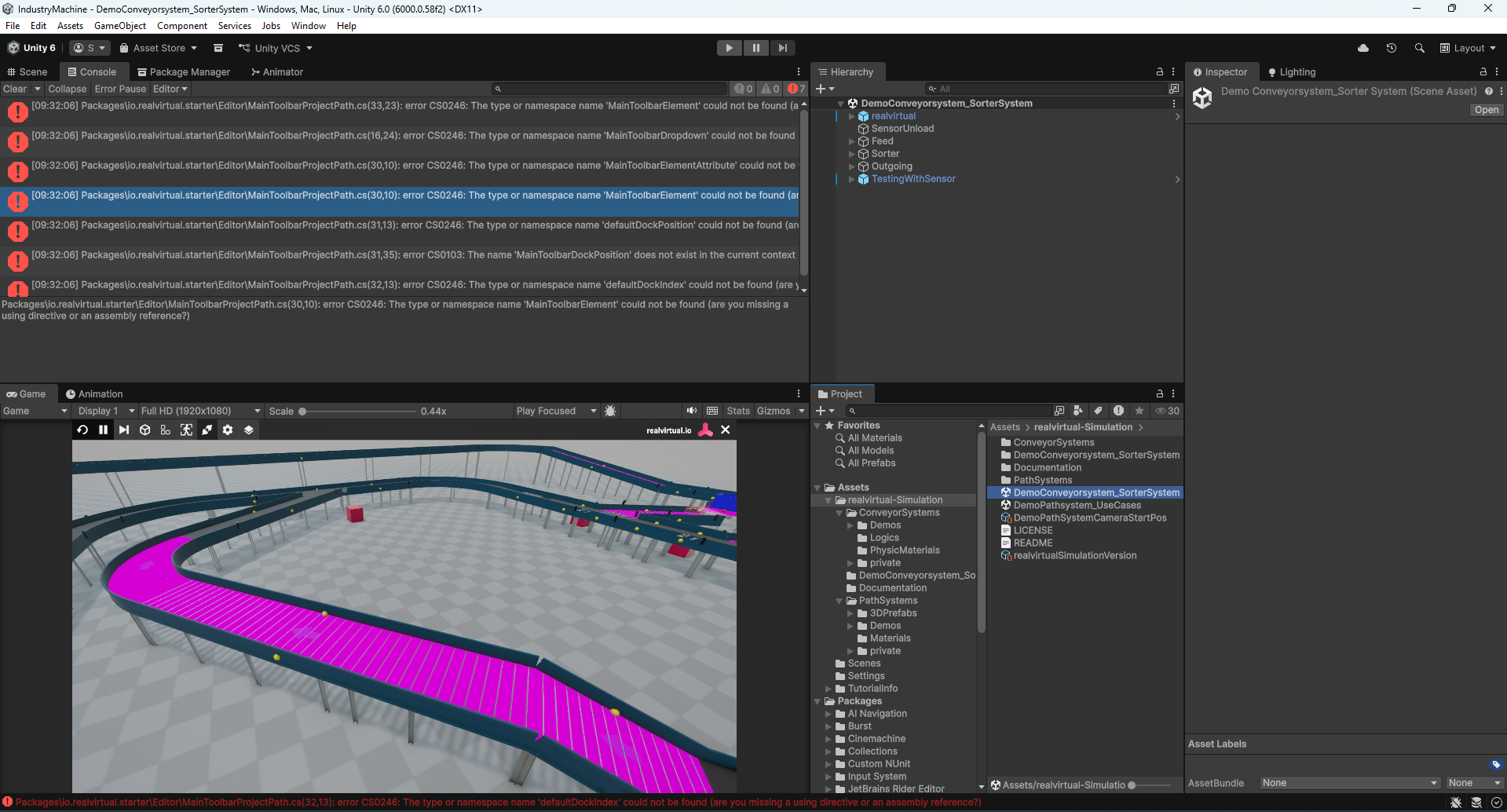

Hi sandong0313,
thanks for the report. These compile errors come from a Unity / realvirtual version mismatch: the realvirtual Digital Twin Starter 6.3 is built for a newer Unity 6000 LTS than 6000.0.58f, so the scripts do not compile on your Editor.
Two options:
1) Switch your project to the Unity 6000 LTS version that Starter 6.3 targets and re-import the package.
2) Or stay on Unity 6000.0 and use the matching realvirtual 6.0.x Starter release instead of 6.3.
Installation guide: https://doc.realvirtual.io/
To point you to the exact compatible build, could you confirm your Unity version (Editor > About)?
Best regards

TRIAL
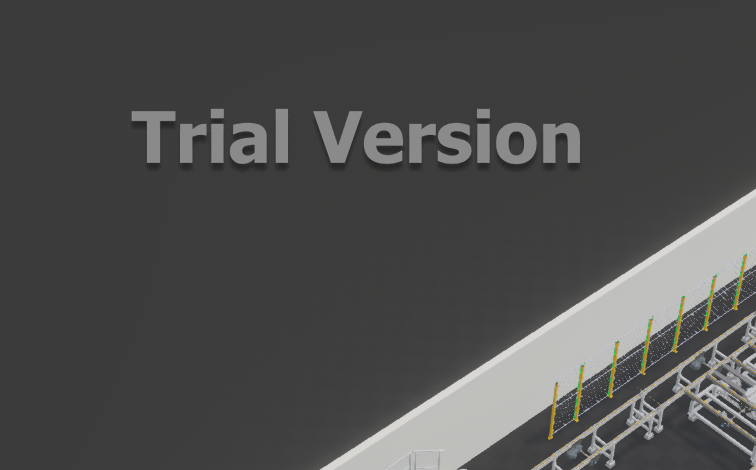
Hi, after making a build for the windows platform I see a big inscription trail verison, I have purchased the pro version, what's going on, the matter is urgent!
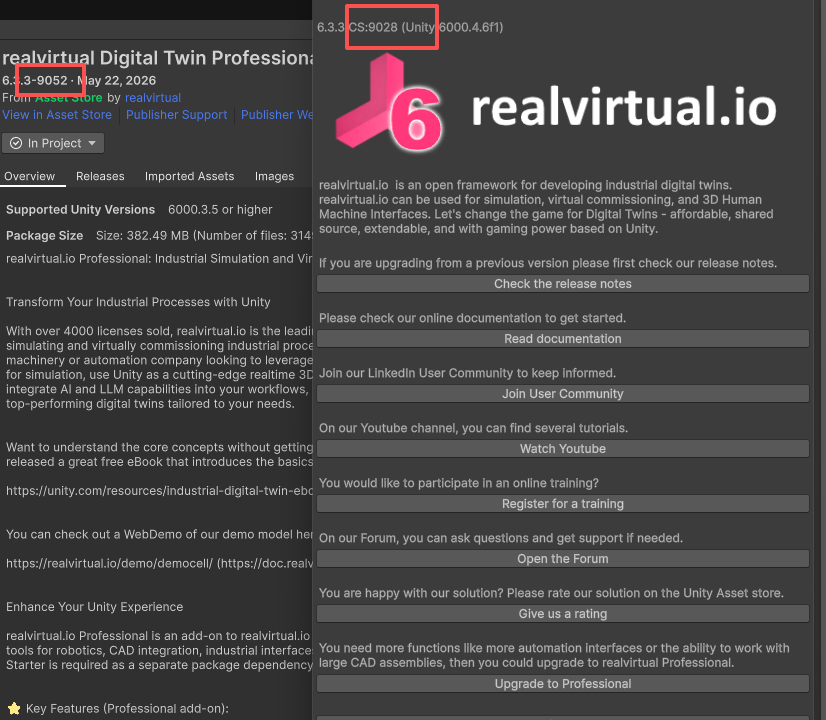
Downloaded version mismatch
Hello,
I selected version 6.3.3-9052 for download, but upon importing the downloaded file locally, the actual version turned out to be 6.3.3-9028.
Similarly, when attempting to download version 6.0.12-8862, the file I received was 6.0.12-8592.
I have verified this behavior through multiple tests, and the results were consistent each time; other users have also reported this issue.
I look forward to receiving a reasonable explanation from the official team.

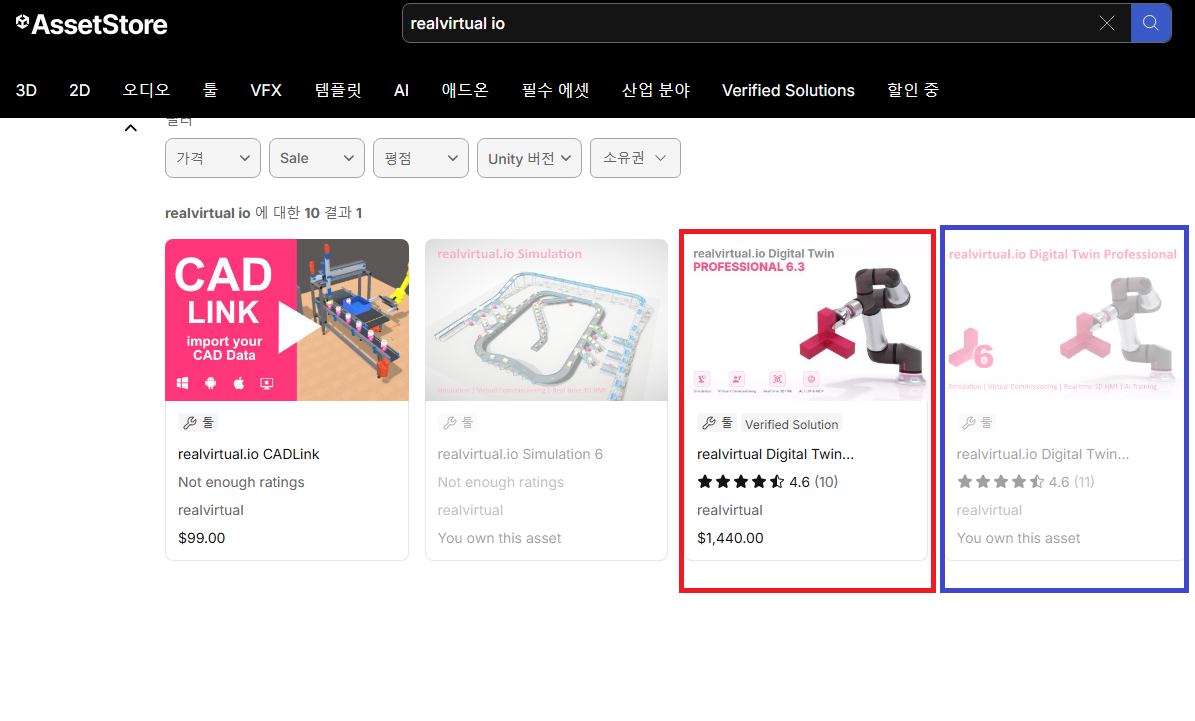
RealVirtual I.O Digital Twin Professional version 6 vs 6.3
Dear,
I purchased and am currently using RealVirtual I.O Digital Twin Professional version 6.
Recently, when I tried to update my Unity project to version 6.3,
I discovered that RealVirtual I.O Digital Twin Professional version 6.3 must be purchased separately.
I have two questions.
1) Do users who purchased RealVirtual I.O Digital Twin Professional 6.0 have to pay to purchase version 6.3 again?
(Is there no policy for upgrade costs rather than new purchases?)
2) Could you please tell me the key feature differences between RealVirtual I.O Digital Twin Professional 6.0 and 6.3?
Thanks.
Best regards,
Seokhyun Lee

uninstall
나 installed tool in Unity6.
but I Can't UnInstall.
피lz Tell me how to Uninstall this.
PLCSimAdvancedCoupler.exe
Hi, when I try to run PLCsimAdvance and configure it, the same error appears as on SS and, the PLCSimAdvancedCoupler.exe download page does not exist.

Customer support service by UserEcho