Teilen Sie Ihre Erfahrunge und Wünsche mit uns und anderen Usern!
Teilen Sie Ihre Erfahrunge und Wünsche mit uns und anderen Usern!

 [Not Solved] Compile Error after realvirtual AI Builder Package Installation with Unity 6 LTS Version
Dear,
Sorry But,
The problem is not solved.
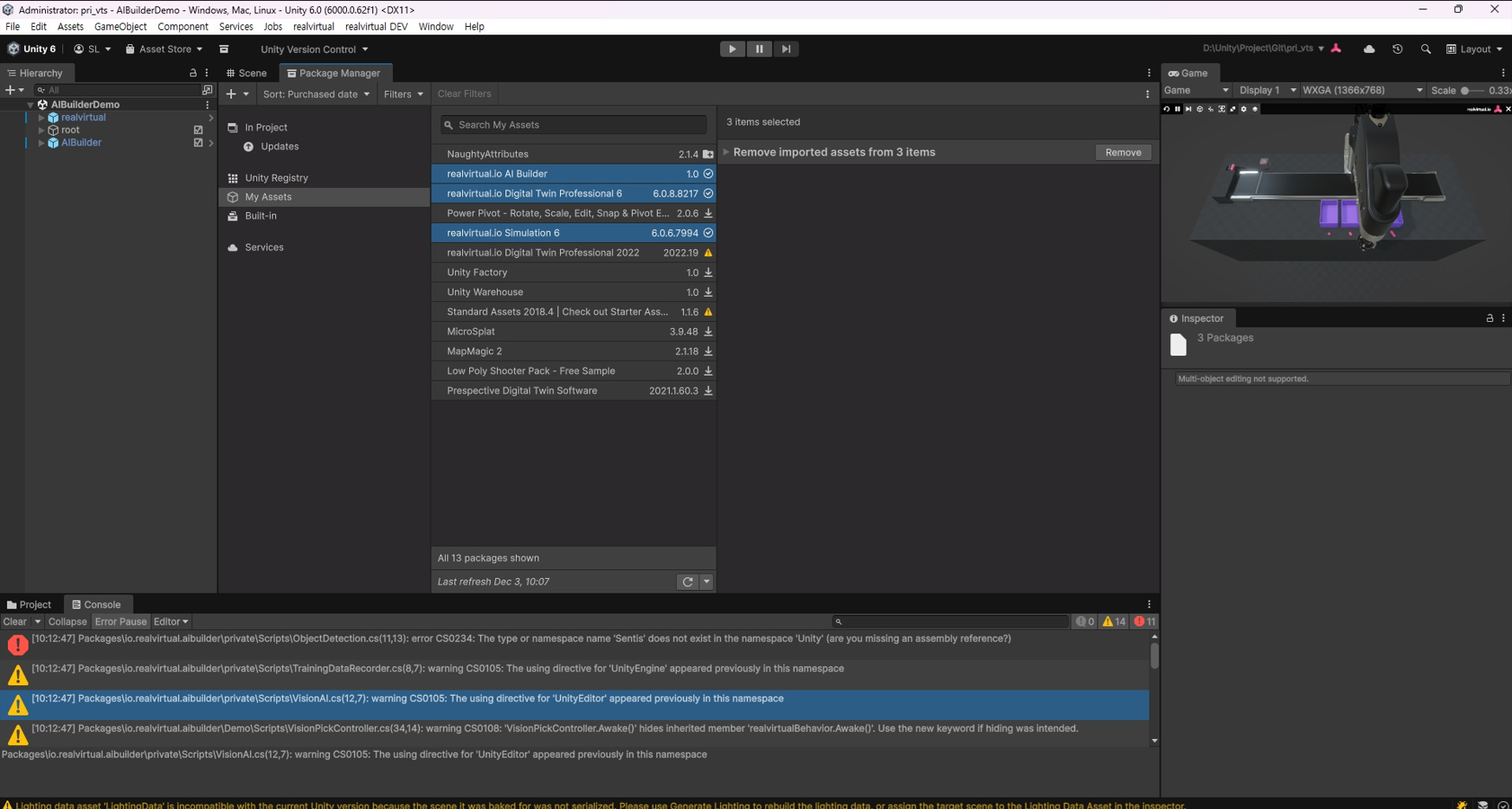
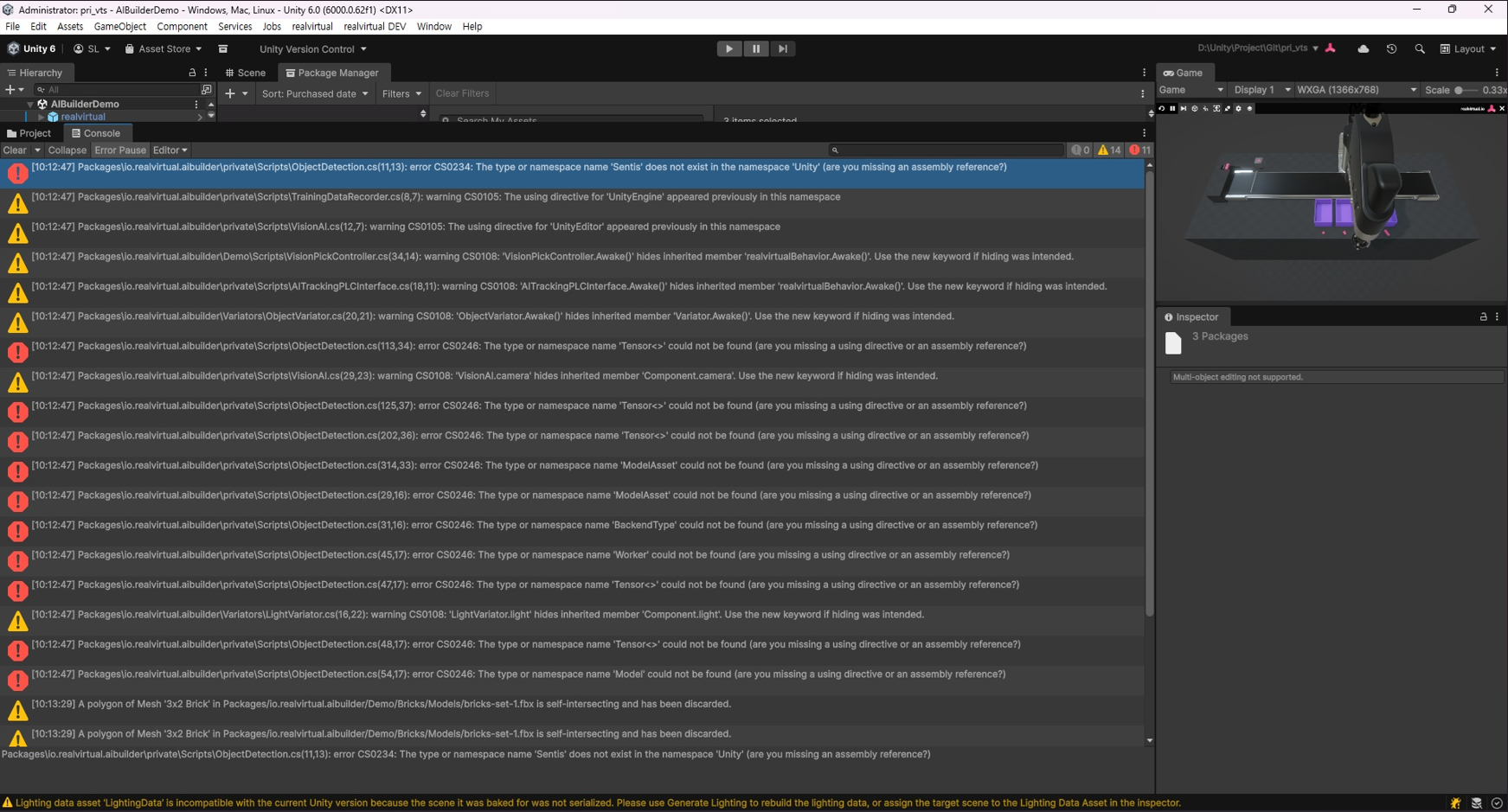
I'm having trouble again with a compile error after installing RealVirtual AI Builder with Unity 6 LTS version.
1) Unity 6 LTS Version (6000.0.62f1)
2) Install RealVirtual IO Digital Twin Professional (6.0.8) & Simulation 6 (6.0.6) → OK
3) Install RealVirtual IO AI Builder 1.0
→ Compile error occurs (see image below)
I would like to request guidance on how to resolve this issue so I can use RealVirtual AI Builder.

 S7 connection - get_gameObject can only be called from the main thread.
Hi,
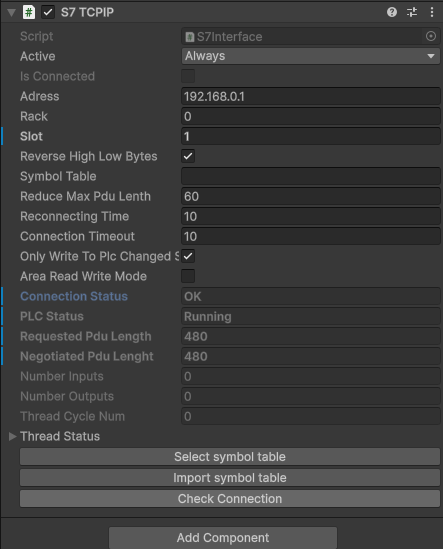
When trying to make an S7 connection (new empty scene) in the realvirtual.IO starter kit I have following issue.
The connection is OK and running in Scene mode, but once in Game mode, I see I have following error:
Connection failed: get_gameObject can only be called from the main thread.
Constructors and field initializers will be executed from the loading thread when loading a scene.
Don't use this function in the constructor or field initializers, instead move initialization code to the Awake or Start function.
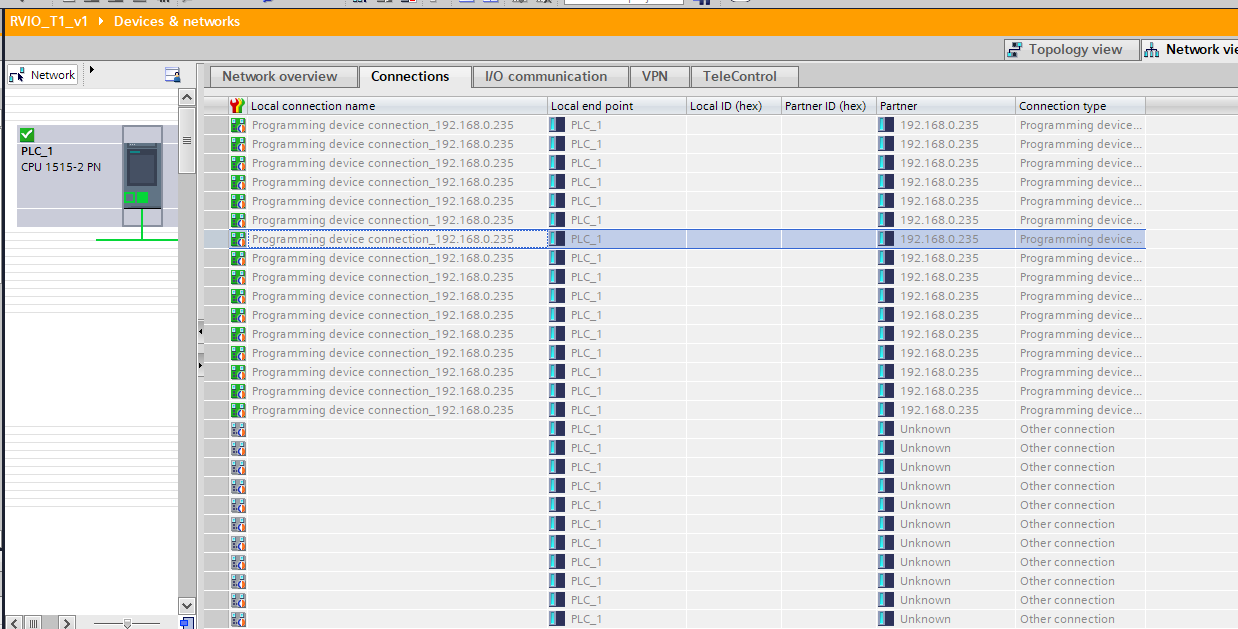
In the connection view of TIA portal I see a lot of connection active.
Does anyone has any advise on how to solve this?
Unity version

siemens CPU 1515-2-PN

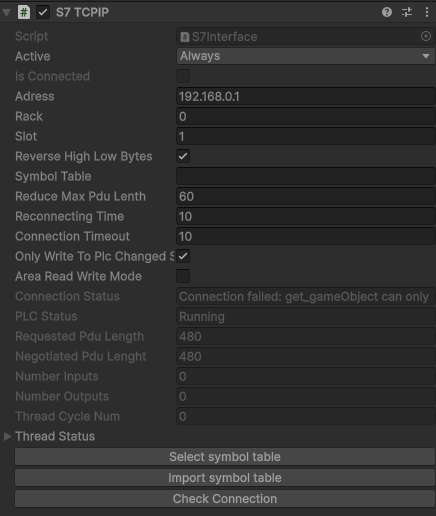
Connection failed: get_gameObject can only be called from the main thread.
Constructors and field initializers will be executed from the loading thread when loading a scene.
Don't use this function in the constructor or field initializers, instead move initialization code to the Awake or Start function.

How to build a gantry
Hi everyone,
I’m trying to figure out the best way to model a gantry in realvirtual and I’d like to check if my approach makes sense.
Mechanical setup
-
Think of a classic gantry crane

-
In my machine I have
-
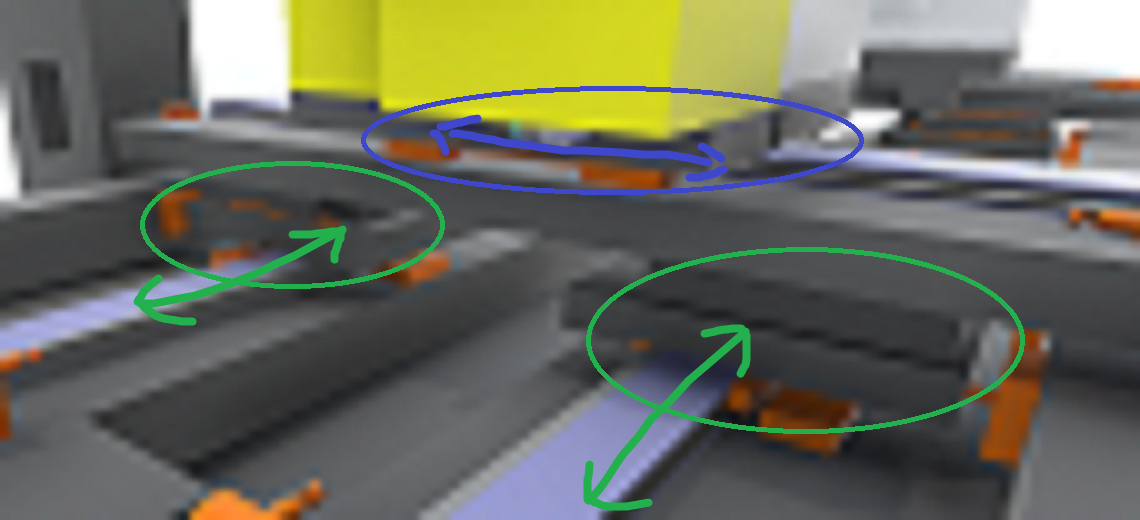
Two separate X-axes at the bottom (front and back rails – green arrows).
They can move independently in X, but in normal operation they should behave like a gantry pair. -
On top of them sits a Y-axis stage (blue arrows) that moves sideways.
-
-
The Y-stage is physically connected to the X-axes via joints in Unity.
-
The CAD / Unity hierarchy is basically flat – the Y-stage is not a child of one of the X carriages, so I cannot rely on parenting to move it together with X.
Control side
-
I have separate drives / axis values for:
-
X-front
-
X-back
-
Y-stage
-
-
The requirement is:
-
When X moves, the whole Y-stage must move with it.
-
Y should still have its own motion relative to the gantry.
-
Questions
-
What is the recommended realvirtual setup for this kind of gantry?
-
How should I combine this with joints?
-
Should I keep the joints at all, or would you recommend a purely kinematic Axis/Drive setup for this use case?
-
Any hints, best practices, or “don’t do this” stories are very welcome.
Thanks in advance!

Hi,
Thanks for reaching out!
For building hierarchical structures in your simulation, we'd recommend using parenting or Groups combined with Kinematic — you can find detailed guidance here: https://doc.realvirtual.io/components-and-scripts/motion/kinematic
One of the nice things about this approach is that it gives you flexibility regardless of how your Unity hierarchy is currently organized. Moving drives without physical joints also tends to provide better stability, which is especially helpful when you're receiving cyclic position updates from controllers.
As a tip that might simplify things: from a kinematic perspective, X-Front and X-Back effectively function as a single drive, so you may not need to model them separately — that could save you some setup work!
Let me know if you have any questions or if I can help clarify anything further.
Best regards
Thomas

Source a MU without rigid body component?
I would like to simulate pick and place processes of parts by using kinematics without physics. I am struggling with my understanding of the MU, Source, Grip/Fix concepts.
What do I have to do to make a sourced MU part a subcomponent without physics?
SceneMouseNavigation.LateUpdate uses FindObjectsByType<TMP_InputField> every frame → catastrophic global scan on large scenes
LateUpdate in SceneMouseNavigation calls CheckForFocusedFields which uses FindObjectsByType.
On large scenes, this per-frame global lookup produces unacceptable frame times.
FindObjectsByType should not be called every frame.
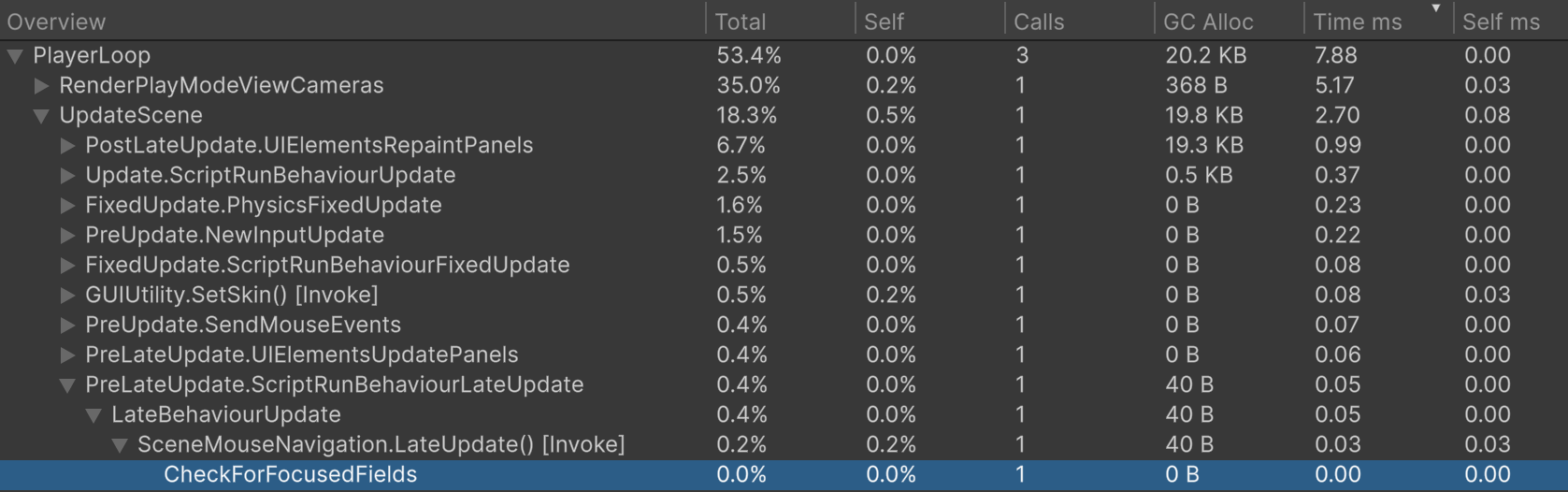
This is the profiler result with 4000 active and 400.000 inactive objects in the scene:

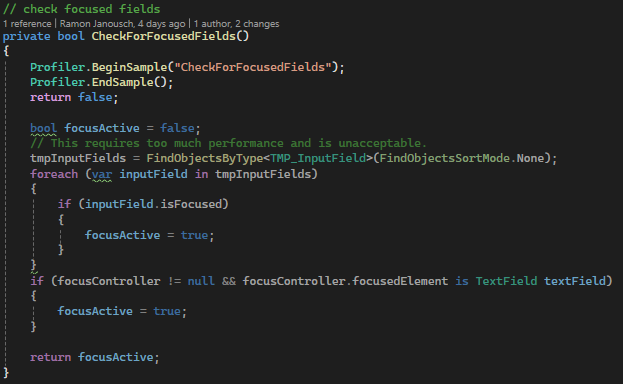
Same scene with an early return in CheckForFocusedFields.
Environment:
- Unity 6000.2.10f1
- realvirtual-Professional-6.2.1
- Windows 10 x64
- RAM 32 GB
- CPU Intel Xeon W-11955M @2.6 GHz (8 Cores)
Compile Error after realvirtual AI Builder Package Installation with Sentis (InferenceEngine)
Dear,
I'm having trouble with a compile error after installing RealVirtual AI Builder.
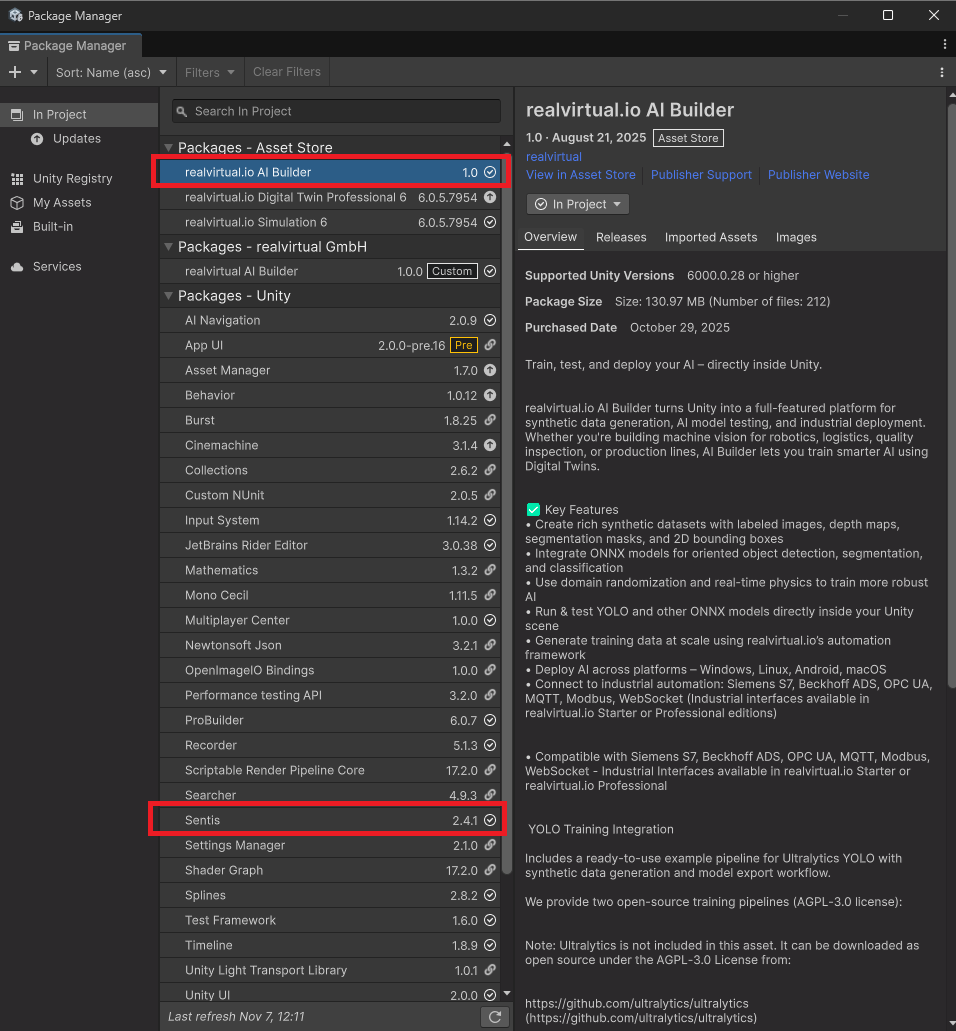
1) Install Sentis (InferenceEngine) 2.4.1
2) Install RealVirtual AI Builder 1.0
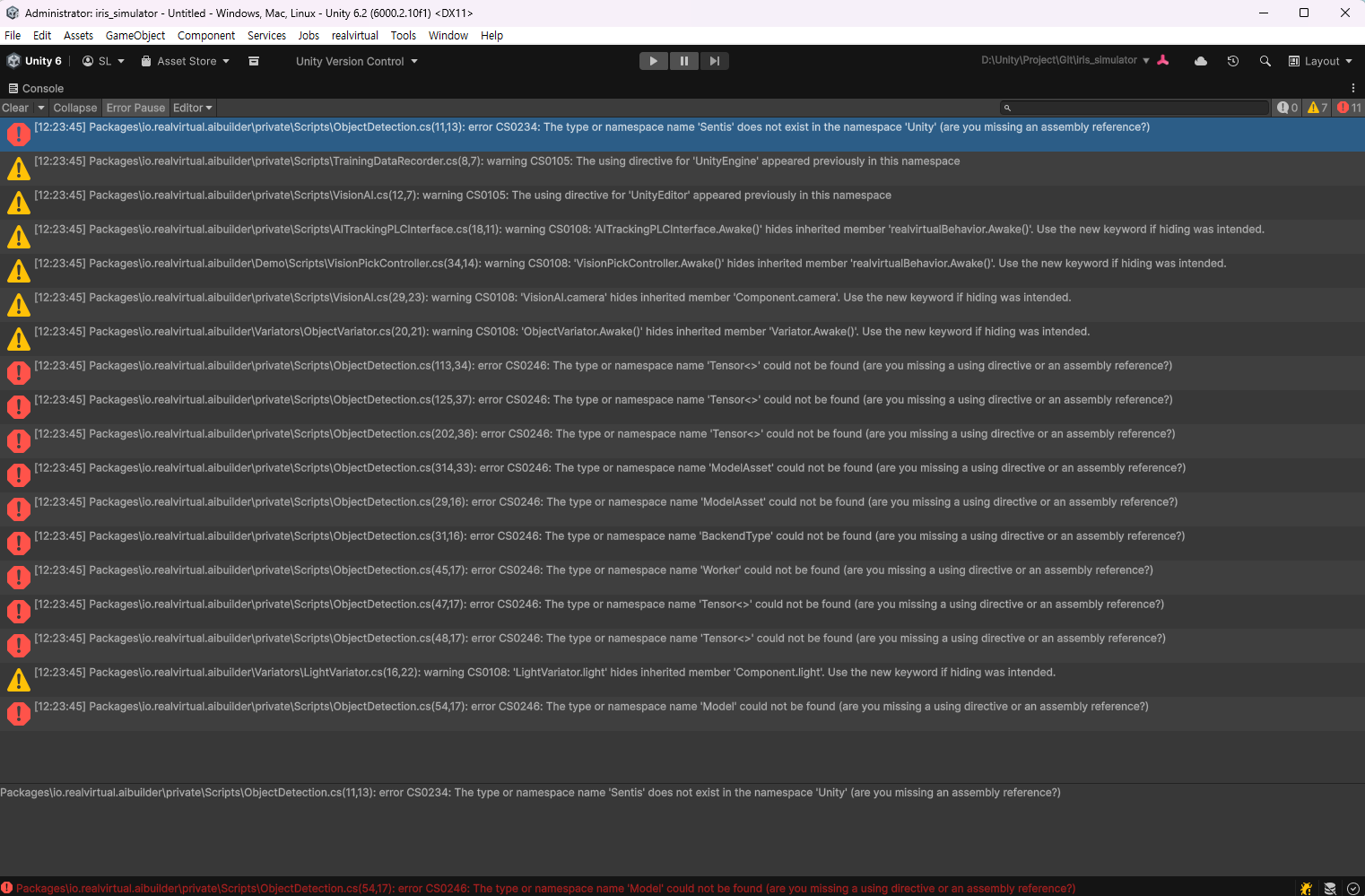
→ Compile error occurs (see image below)
To resolve this issue, I tried changing Unity.Sentis to Unity.InferenceEngine in the ObjectDetection.cs script where the error occurs, but this did not resolve the issue.
I would like to request guidance on how to resolve this issue so I can use RealVirtual AI Builder.
※ Package Installation Status: RealVirtual AI Builder & Sentis
※ Compile Error Status

S7_Interface AreaReadWriteMode MinAreaDBInput causes data reading exception
Hello, I am a Chinese user and I greatly appreciate your company's products
Based on the Pro6 Ver8152 test, the S7_interface AreaReadWriteMode DB test found the following issues (everything is normal in non AreaReadWriteMode mode, but the communication load is high):
1.At the beginning, the O/I of my DB5 corresponded to PLC Output/Input and S7_interface settings:
AreaReadWriteMode:True
DBOutputs:5
MinAreaDBOutput:0
MaxAreaDBOutput:143
DBInputs:5
MinAreaDBInput:144
MaxAreaDBInput:277
ArgumentException: Offset and length were out of bounds for the array or count is greater than the number of elements from index to the end of the source collection.
System.Buffer.BlockCopy (System.Array src, System.Int32 srcOffset, System.Array dst, System.Int32 dstOffset, System.Int32 count) (at :0)
realvirtual.S7Interface.WriteS7 () (at Assets/realvirtual/Interfaces/S7TCPIP/S7Interface.cs:933)
realvirtual.S7Interface.CommunicationThreadUpdate () (at Assets/realvirtual/Interfaces/S7TCPIP/S7Interface.cs:1083)
realvirtual.InterfaceThreadedBaseClass.CommunicationThread (System.Threading.CancellationToken token) (at Assets/realvirtual/Interfaces/InterfaceThreadedBaseClass.cs:226)
realvirtual.InterfaceThreadedBaseClass.b__36_0 () (at Assets/realvirtual/Interfaces/InterfaceThreadedBaseClass.cs:124)
System.Threading.ThreadHelper.ThreadStart_Context (System.Object state) (at :0)
System.Threading.ExecutionContext.RunInternal (System.Threading.ExecutionContext executionContext, System.Threading.ContextCallback callback, System.Object state, System.Boolean preserveSyncCtx) (at :0)
System.Threading.ExecutionContext.Run (System.Threading.ExecutionContext executionContext, System.Threading.ContextCallback callback, System.Object state, System.Boolean preserveSyncCtx) (at :0)
System.Threading.ExecutionContext.Run (System.Threading.ExecutionContext executionContext, System.Threading.ContextCallback callback, System.Object state) (at :0)
System.Threading.ThreadHelper.ThreadStart () (at :0)
UnityEngine.<>c:b__0_0(Object, UnhandledExceptionEventArgs)
2. Through debugging and positioning, I modified some of the code and wrote it to PLC.DB.tags normally, but all reads failed without any errors:
WriteS7()
{
...
if (AreaReadWriteMode)
{
...
case S7InterfaceSignal.S7TYPE.BYTE:
Buffer.BlockCopy(bytes, 0, dstarea, pos, 1);
break;
case S7InterfaceSignal.S7TYPE.WORD:
Buffer.BlockCopy(bytes, 0, dstarea, pos, 2);
break;
case S7InterfaceSignal.S7TYPE.DWORD:
Buffer.BlockCopy(bytes, 0, dstarea, pos, 4);
break;
case S7InterfaceSignal.S7TYPE.SINT:
Buffer.BlockCopy(bytes, 0, dstarea, pos, 2);
break;
case S7InterfaceSignal.S7TYPE.INT:
Buffer.BlockCopy(bytes, 0, dstarea, pos, 2);
break;
case S7InterfaceSignal.S7TYPE.DINT:
Buffer.BlockCopy(bytes, 0, dstarea, pos, 4);
break;
case S7InterfaceSignal.S7TYPE.USINT:
Buffer.BlockCopy(bytes, 0, dstarea, pos, 1);
break;
case S7InterfaceSignal.S7TYPE.UINT:
Buffer.BlockCopy(bytes, 0, dstarea, pos, 2);
break;
...
}
...
}
3. Clone PLC DB5 to DB3, set DBInputs to 3, MinAreaDBInput to 0, and read/write everything is normal
4. Modify MinAreaDBInput: 2, the last 2Byte Read in the Read area is invalid
Modify MinAreaDBInput: 4, the last 4Byte Read in the Read area is invalid
... and so on
5.In OPCUA mode, Unity is played twice, but the value of PLCINput is restored to default, but the PLC memory remains in the same state as when the first attempt ended without any changes
6. I debugged the same Unity simulation project implementation based on our own S7.NET communication program: the conveyor belt transfers the tray until the PLC detects the Unity sensor signal and stops, and the OPCUA signal of RealVirtual.io always detects it and runs for a distance before stopping (the faster the speed, the farther it exceeds the distance). However, our own use of S7.NET does not have this problem (we use S7.NET.ReadClass to batch read, parse, update the drive object, update the ValueChange, update the WriteData, and WriteClass to time 50ms WirteData to the PLC).
Could you please help analyze and provide feedback on the above issues? Additionally, I have code to convert the DB exported by the PLC into complete XML, and I hope to modify it into the tag import mechanism of OPCUA in the future (as RealVirtual 6 does not support DB import, I am currently using OPCUA to import PLCTags, and then using OpcuaTagoS7 to change the OPCUA tag to S7Interface AreaReadWriteMode for communication, as I am concerned about the performance issues of OPCUA's subscription mode for large-scale PLCTAGS)
I have sent you the relevant attachments via email. Regarding the method of generating PlcTagsXML from DB, you can also contact me if you need it, because we have successfully tested and verified this aspect through the project (the method found online has multiple bugs in the calculation of S7 address offset).
Looking forward to your reply~
S7_Interface AreaReadWriteMode Debug.zip
By:Liuxingsuifeng
Email: 410701881@qq.com
We fixed all things discussed in this thread - will be available in upcoming release 6.0.8

How can I use Modern Drive Gizmos and Drive handles in 6.0.7?
I'm starting out with RealVirtual, and I've ran into a problem right away regarding the UI.
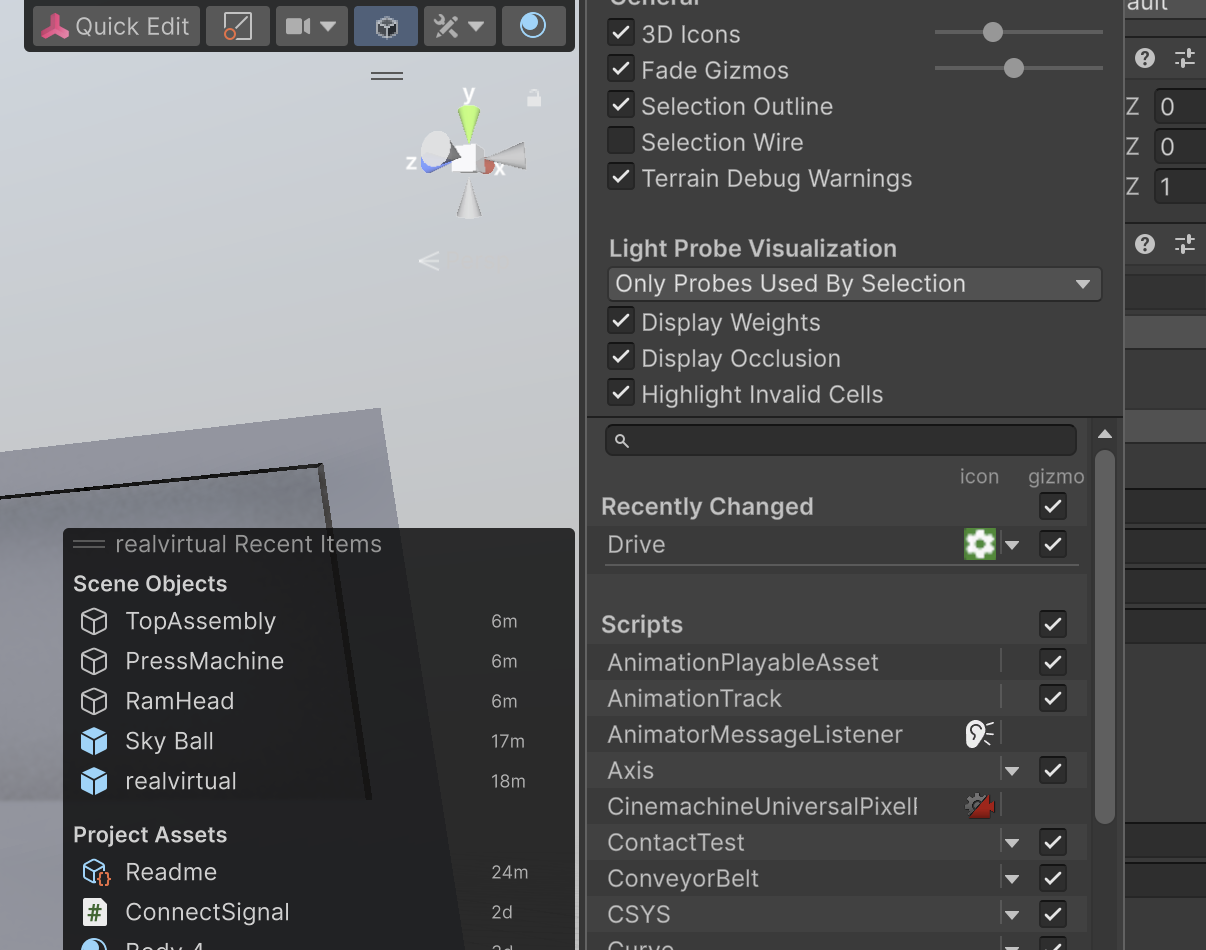
In this doc, it says that a Modern Drive Gizmo should be shown When I select a drive, but I don't see any kind of handles other than native unity handles.
I checked the Drive in the settings panel and also added an icon, but I'm not seeing any kind of icons or gizmos in the main 3D view nor in the hierarchy view. This is a new clean project using Unity 6 LTS and RealVirtual 6.0.7. The only thing I've added is our 3d model that is not modified since import.
https://doc.realvirtual.io/components-and-scripts/motion/drive#modern-drive-gizmos-updated-in-6.0.3

Chain Transfer Issue
The normal sample scene works great, as well as the majority of the others! Although I am running into major issues with a few components and other test scenes. The chain transfer sample scene does not work at all. The main issue seems to be the chain does not lift no matter what I try. I've changed many parameters and even tried to use the transfer in my own projects but it will not lift off the conveyor. It shows that its moving 'Out', but no motion actually occurs even with exaggerated positions. I was hoping to just use this chain transfer object as its exactly what I need, but it isnt responding. Any ideas on what I may be doing wrong? Unity Version 6000.0.61f1
Realvirtual pro version 6.0.7.8152
realvirutal sim version 6.0.5.7954

[Help Needed] FANUC RobotInterface
Hi everyone,
I'm working with the FanucInterface component in realvirtual.io to connect Unity to RoboGuide.
I'm able to connect Unity and Roboguide through SNPX
I'm able to read UO and DO signals from the robot in Unity but I'm not able to write DI or UI signals.
Setup:
- RoboGuide: HandlingPro Classic Version 10 (Rev.C_SR4)
- Unity: Unity 6.2 with realvirtual.io V6.0.7.8152
Senden Sie uns Ihr Feedback
Wir hören zu und setzen Ihre Ideen um.
How to build a gantry
SceneMouseNavigation.LateUpdate uses FindObjectsByType<TMP_InputField> every frame → catastrophic global scan on large scenes




PLC SIM Advanced 6.0 Windows 11 Realvirutal Unity 6
Need IK support for 6-axis collaborative robots (Cobot)

